Operator Console Guide (UNS Console)
This manual explains how human operators, responders, producers, and support engineers use the UNS Console (apps/ui) to inspect notification deliveries, triage human acknowledgment obligations, evaluate policy resolution and revision history, recover dead-lettered notifications, monitor system invariants, correlate the compliance audit stream, and consult in-portal runbooks.
1. Core Principles, Capability Scopes & Safety Boundaries
- Read-First Flight Instruments + Scoped Responder/Operator Actions:
- All
/ui/*read-model endpoints remain strictly non-mutating (INV-UI-001). - Responder, producer, and administrative actions are gated by server-verified capability scopes (
GET /ui/session) and execute against the authoritative/api/v1/*endpoints under full backend invariant and audit enforcement. - Server-Verified Capability Pills (
GET /ui/session): The top navigation bar displays capability pills mapped from the authenticated principal's scopes (adminprincipals display theOPERATORbadge, which encompassesadmin,producer,responder, andobserverscopes, while non-admin scoped principals display their individual role badgesPRODUCER,RESPONDER, andOBSERVER/READ-ONLY): | Capability Pill | Required Scope(s) | Enabled Console Workflows | | :--- | :--- | :--- | |OPERATOR|admin| Full administrative authority: atomic policy reload (POST /api/v1/policies/reload), dead-letter Replay (POST /api/v1/runtime/notifications/{id}/replay) and Resolve (DELETE /api/v1/dlq/{entry_id}), plus all Responder, Producer, and Read-Only (observer) workflows. | |RESPONDER|responder(oradmin) | Inline Acknowledge (POST /api/v1/notifications/{id}/ack) and Dismiss (POST /api/v1/notifications/{id}/dismiss) with optional responder notes on/deliveries/:notificationId. | |PRODUCER|producer(oradmin) | Dry-Run Policy Simulator (POST /api/v1/notifications/simulate) and synthetically tagged[TEST]live verification dispatch (POST /api/v1/notifications) in/policy. | |READ-ONLY|observeronly | Non-mutating telemetry inspection across/deliveries,/policy,/operations,/invariants,/audit, and/docs. | - Modernist Badge Visual Grammar (Filled Delivery vs. Outlined Response):
- Filled Badges (Machine Delivery State): Solid fills indicate channel transport outcomes (
DELIVERED/SUCCESSin solid#201e1dcharcoal ink;FAILED/DEAD-LETTERin solid#ec3013signal vermilion;DEDUPLICATEDin stone#eae9e9;PENDINGin dashed neutral stroke). - Outlined Badges (Human Obligation & Resolution State):
1.5pxstroked transparent badges indicate human response status (ACKED,DISMISSED,ACK TIMEOUT/TIMED_OUT,ACK PENDING) and dead-letter resolution (RESOLVED/FAILURE_RESOLVED), preventing visual conflation between transport delivery and human acknowledgment. - Profile & Mode Banner (
LOCAL RECORDING MODE): The top-of-pageLOCAL RECORDING MODEbanner (PROFILE: LOCAL-RECORDING) is injected by the local-recording deployment profile (deploy/local/local_app.py) when running the local recording stack (indicating that Slack, email, and PagerDuty channels record receipts locally rather than sending external messages), while standard deployments exposepersistence_modeviaGET /readyzon/operations(andGET /ui/session).
2. Signing In & Multi-Tab Session Lifecycle
- Open the UNS Console in your browser (
http://localhost:5173in local development,http://127.0.0.1:18080in the persistent local recording deployment, or your production HTTPS origin). - At the Sign In prompt (
ConsoleSignIn), enter your configured credential (UNS_API_KEY,UNS_RESPONDER_API_KEY,UNS_PRODUCER_API_KEY, orUNS_OBSERVER_API_KEY). - Capability Introspection Probe: Before mounting console routes, the app authenticates against
GET /ui/session(Authorization: Bearer <key>) to verify the credential and hydratesubject,scopes, andpersistence_mode(falling back toGET /ui/audit?limit=1if running against an older backend). - Tab-Memory Storage & Multi-Tab
BroadcastChannelSync: - Your API key is stored exclusively in JavaScript memory (
apps/ui/src/auth/session.ts) and is never written tolocalStorage,sessionStorage, cookies, or URL query parameters. - Open tabs on the same origin synchronize active credentials and sign-out events in memory via
BroadcastChannel('uns_console_session')(UNS_SESSION_REQUEST,UNS_SESSION_GRANT,UNS_SESSION_SYNC,UNS_SESSION_EXPIRE,UNS_SESSION_CLEAR). - Session Expiration & Error Handling:
401 Unauthorized: Immediately invalidates the matching in-memory credential across tabs (expireConsoleSession) and returns to the sign-in screen with an expired-session notice.403 Forbidden: Surfaces an inline authorization error when an action exceeds the current credential's scopes without destroying the valid session.
3. Navigating the Six Console Surfaces
Once signed in, the top navigation bar links to six primary workspaces:
3.1 Deliveries & Obligation Triage (/deliveries and /deliveries/:notificationId)
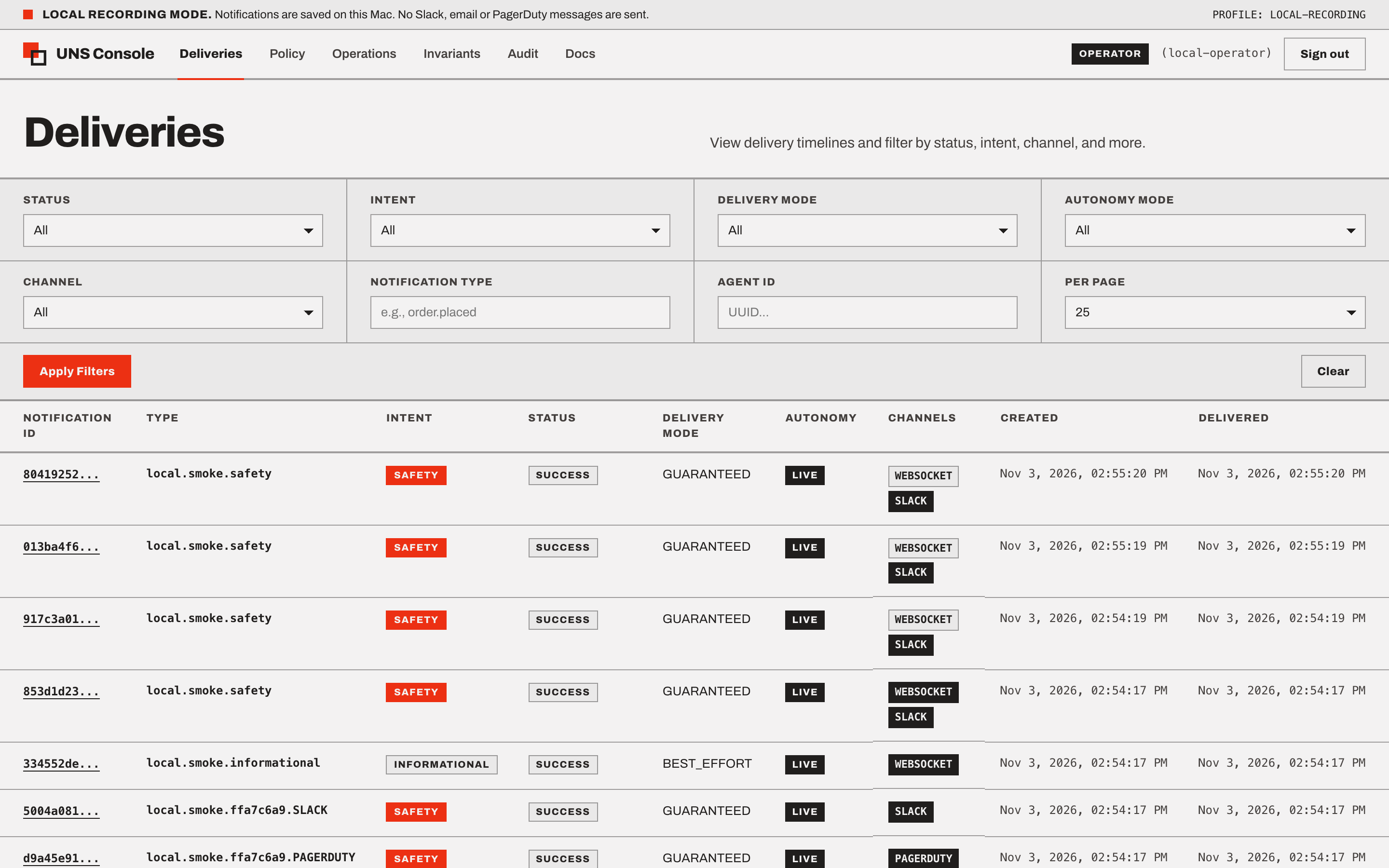
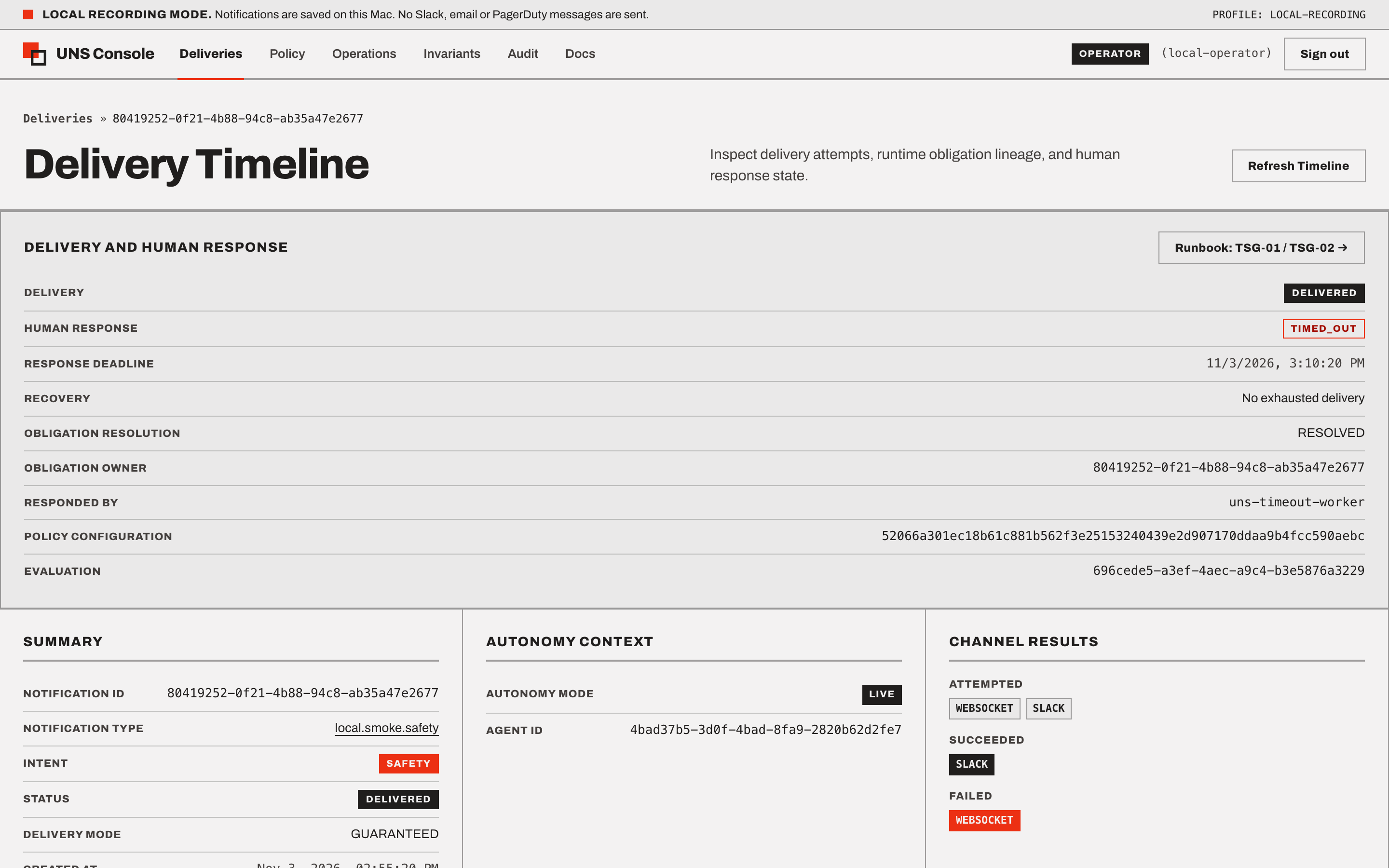
- Deliveries Explorer (
/deliveries): Browse and filter notification obligations (GET /ui/deliveries) by deliverystatus,intent,delivery_mode,autonomy_mode,channel,notification_type, andagent_id. - Delivery Detail & Obligation Triage (
/deliveries/:notificationId): - Header & Autonomy Context: Notification UUID,
notification_type,intent,source,correlation_id,agent_id,autonomy_mode,plan_id, anddecision_snapshot_id. - Canonical Owner vs. Deduplicated Follower Lineage: Displays
obligation_owner_id,ack_inherited,effective_ack_status,obligation_resolution_status, andobligation_resolution_error. When viewing a deduplicated follower (obligation_owner_id !== notification_id), the follower detail view withholds direct ACK/Dismiss buttons to prevent audit-attribution split-brain and provides a direct View Canonical Owner link (/deliveries/{obligation_owner_id}) where the responder reviews and acknowledges/dismisses the canonical owner obligation. - Inline Responder Actions (
RESPONDER/OPERATOR): Execute inline Acknowledge (POST /api/v1/notifications/{id}/ack) or Dismiss (POST /api/v1/notifications/{id}/dismiss) with optional responder notes (metadata.note). If a concurrent transition returns409 Conflict, the view automatically refreshes the timeline and surfaces a concurrency notice. - Inline Dead-Letter Recovery (
OPERATOR): For dead-letteredGUARANTEEDnotifications (dead_letter = true), trigger Replay (POST /api/v1/runtime/notifications/{id}/replay) or Resolve (DELETE /api/v1/dlq/{entry_id}, whereentry_id === notification_idin canonicaluns.Runtime/RuntimeDLQmode). - Bounded Runtime Event Ledger: Displays the chronological
uns_eventsstream (events,events_total_count,events_truncated) capped at the most recent 100 events.
3.2 Policy Workspace (/policy)
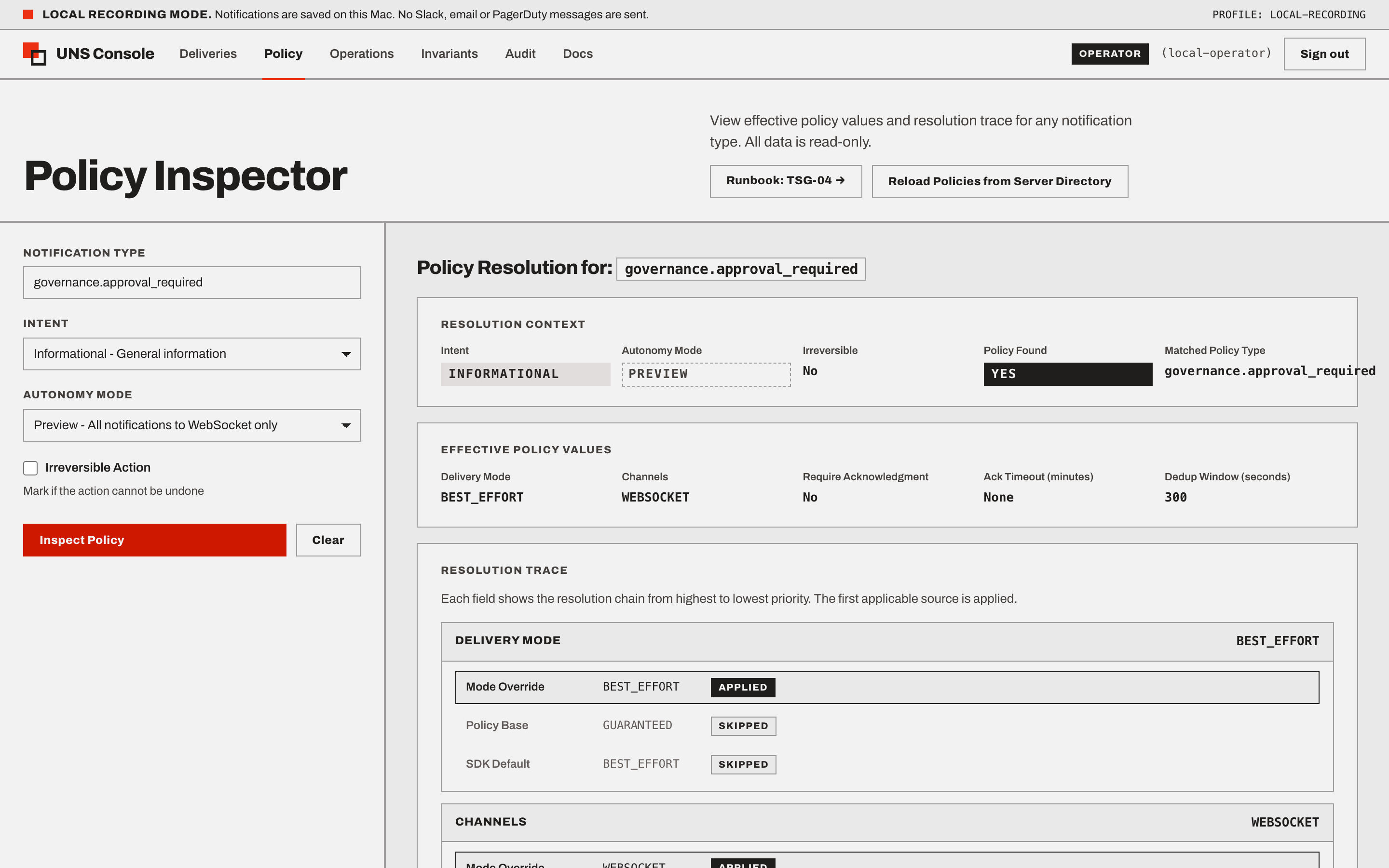
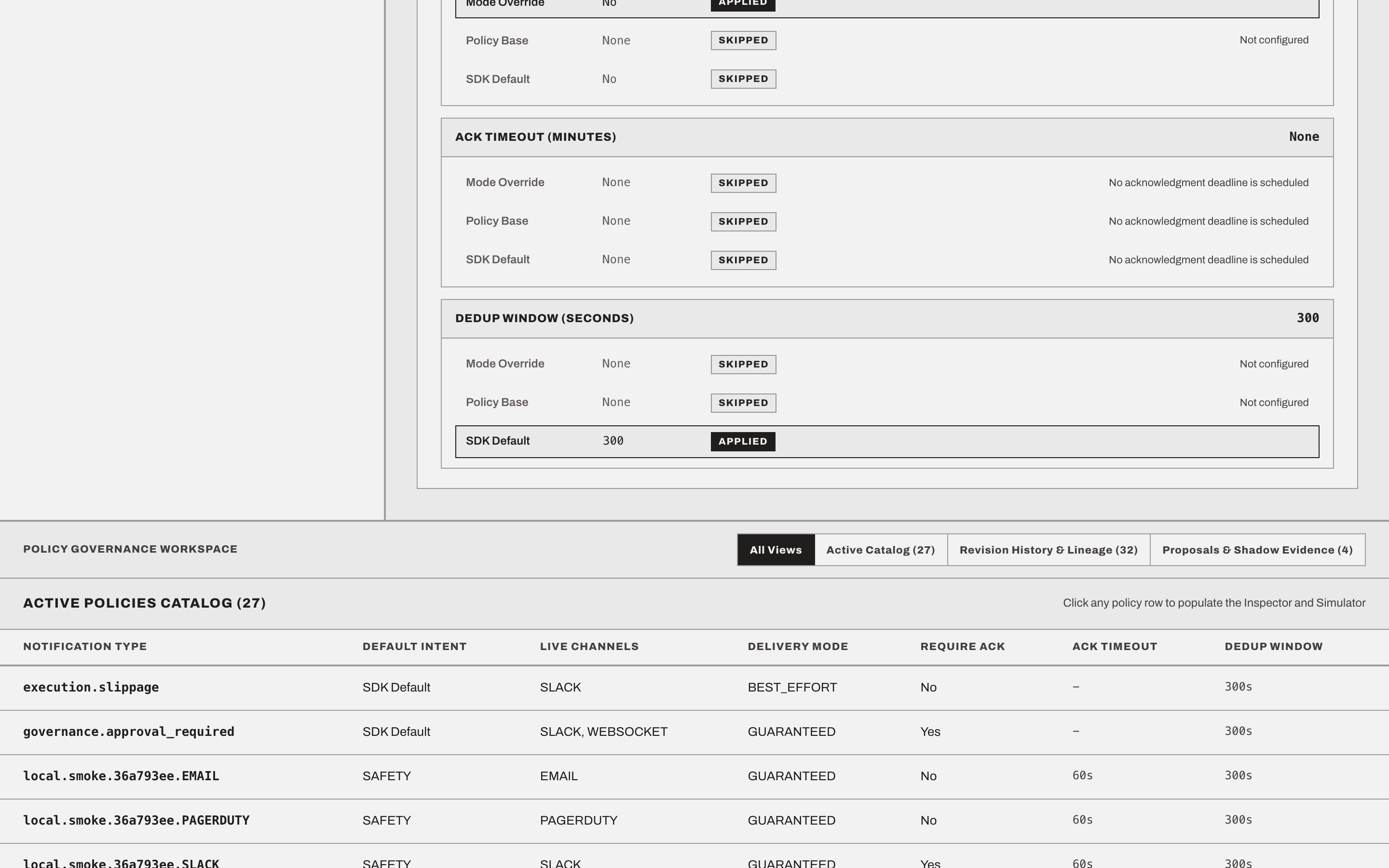
- Active Policies Catalog (
GET /ui/policies/active): Click any registered policy row to populate the inspector and synchronize the?notification_type=deep-link. - Effective Policy Resolution Trace (
GET /ui/policies/effective): Two-column split layout displaying resolved effective values (delivery_mode,channels,require_ack,ack_timeout_minutes,dedup_window_seconds) alongside the step-by-step field precedence trace (explicit_override->mode_override->policy_base->sdk_default). - Policy Revision History & Governance (
GET /ui/policies/revisions): Inspect the durablePolicyRevisionSummaryledger acrossACTIVE,PREVIEW,DRAFT, andRETIREDrevisions with status filter pills, selection-scoped filtering, and fields includingpolicy_id,notification_type,version,status,source,config_hash,previous_version_idlineage chains, and lifecycle timestamps (created_at,activated_at,retired_at). - Proposals & Shadow Evidence (
GET /ui/policies/proposals&POST /api/v1/policies/proposals*): Propose governedPolicyDeltachanges, promote candidates toSHADOW(PREVIEWintake evaluation viaShadowPolicyEvaluator), inspect sample win rates and guard stages (BOUNDS,CONFLICT,INVARIANTS), approve qualifying deltas intoDRAFT, and explicitly activateDRAFT -> ACTIVE. - Dry-Run Simulator &
[TEST]Live Dispatch (PRODUCER/OPERATOR): Preview routing without side effects (POST /api/v1/notifications/simulate) or dispatch a synthetically tagged[TEST]verification signal (POST /api/v1/notificationswithsource: "uns-console-policy-test"andmetadata.source: "uns_console_policy_test"). - Atomic Policy Reload (
OPERATOR): TriggerPOST /api/v1/policies/reloadto validate YAML definitions on disk and atomically advance the active policy snapshot revision.
3.3 Operations & Dead-Letter Recovery (/operations)
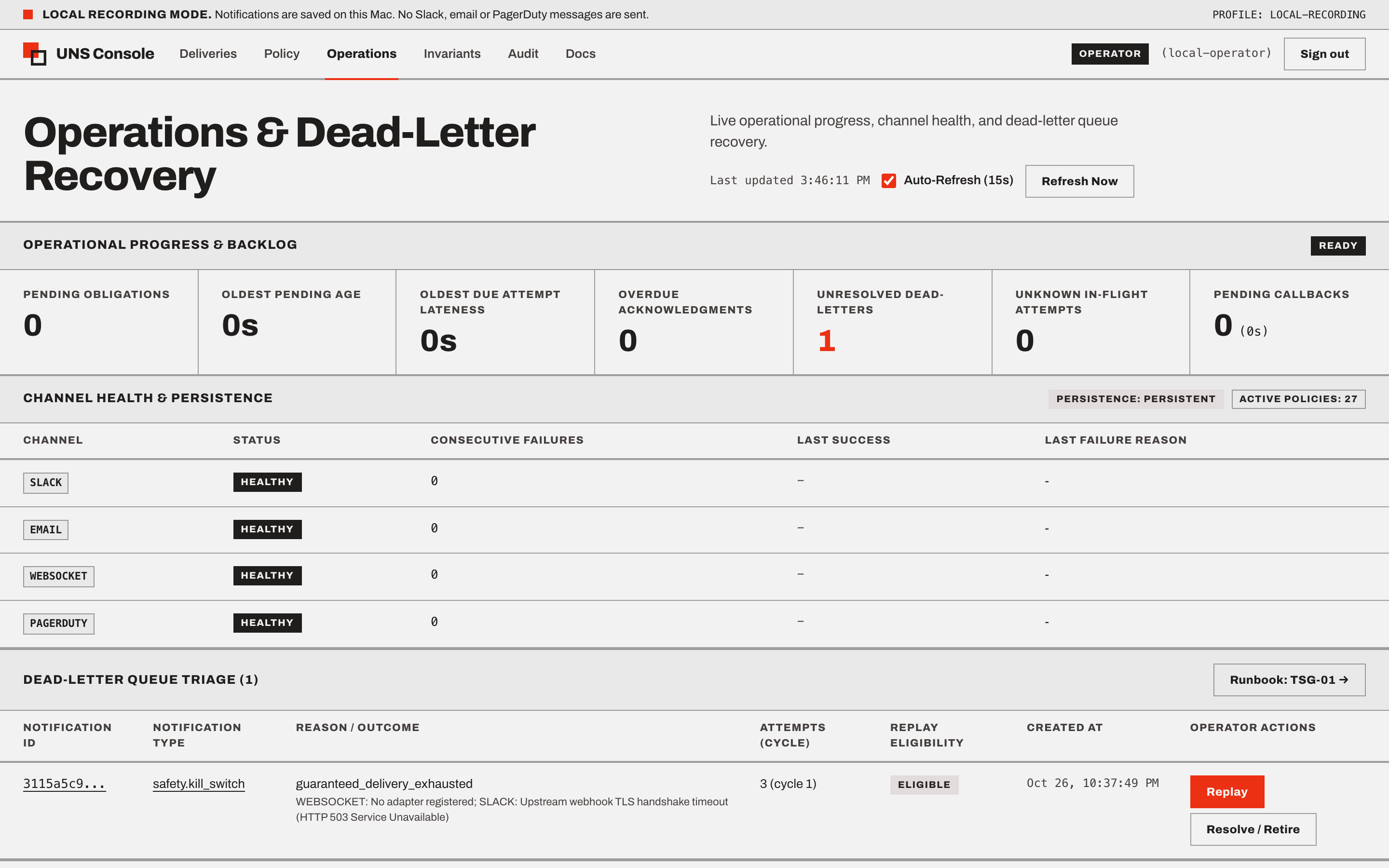
- Fault-Isolated Telemetry Polling: Independently polls four operational endpoints via
Promise.allSettled: GET /readyz(503-tolerant readiness, database connectivity, persistence mode, and DLQ depth)GET /api/v1/channels/health(per-channel adapter health status and consecutive failure counts)GET /api/v1/dlqandGET /api/v1/runtime/dead-letters(full outer join correlated bynotification_id)- Dead-Letter Replay vs. Resolve (
OPERATOR): - Replay (
POST /api/v1/runtime/notifications/{id}/replay): Starts delivery Cycle $N+1$ whenreplay_blocked_byisnull. Automatically disabled when a promoted follower or successor has already satisfied or claimed the obligation (replay_blocked_by != null). - Resolve (
DELETE /api/v1/dlq/{entry_id}): Clearsdead_letter = falsewhile keepingstatus = "FAILED"and recording an auditedFAILURE_RESOLVEDevent.
3.4 System Invariants (/invariants)
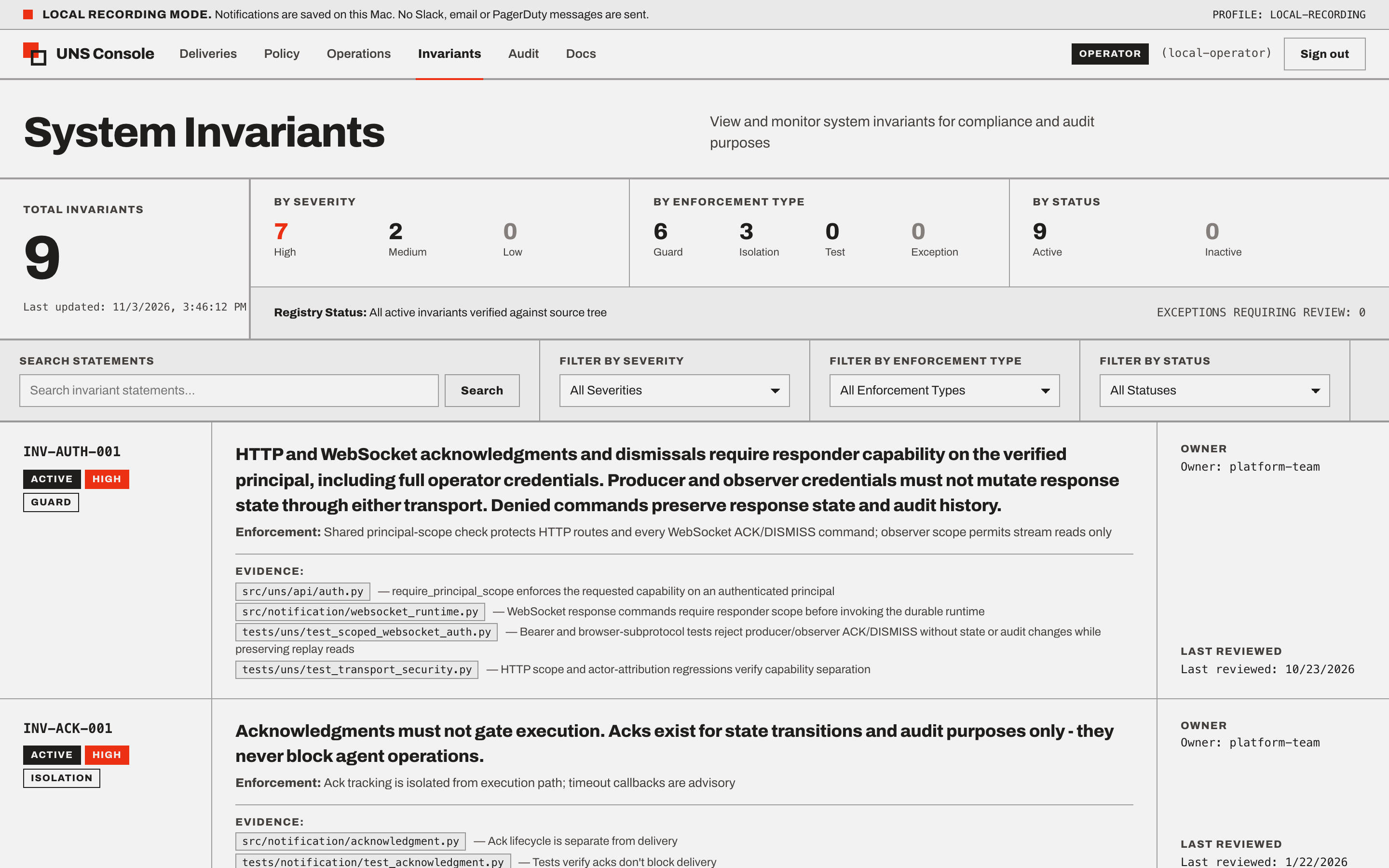
- Purpose: Verify the architectural and safety invariants registered in
docs/verification/invariants.yml(GET /ui/invariantsandGET /ui/invariants/summary). - How to Use: Inspect aggregate totals and breakdowns by severity (
HIGH | MEDIUM | LOW), enforcement type (guard | isolation | test | exception), or keyword search (e.g.,INV-UI-001), and expand any row to view repository evidence links.
3.5 Audit Timeline (/audit)
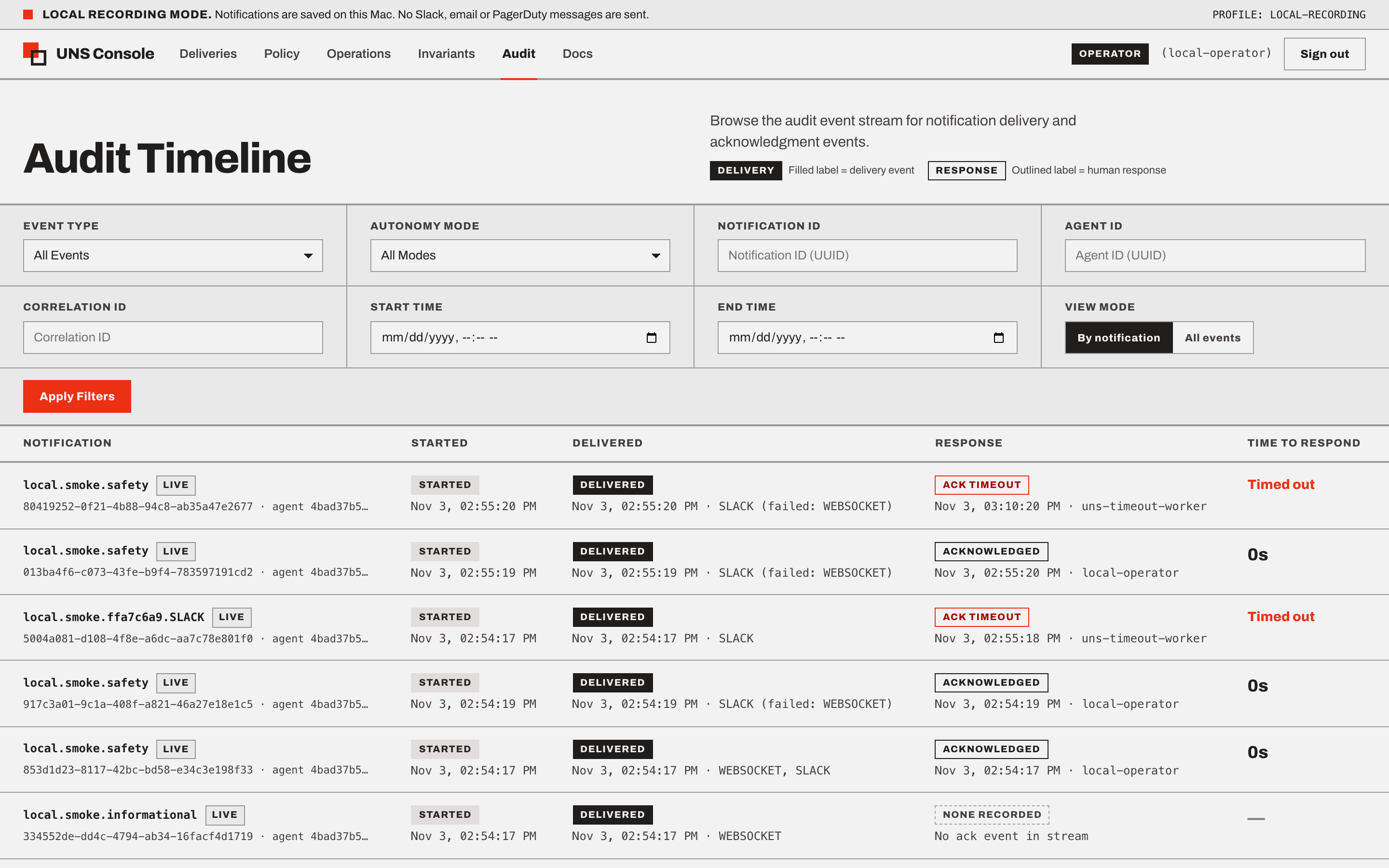
- Dual-Mode Compliance Timeline (
GET /ui/audit): 1eBy notification (Default Lifecycle View): Correlates all audit events for eachnotification_idinto an expandable lifecycle row (NOTIFICATION | STARTED | DELIVERED | RESPONSE | TIME TO RESPOND), automatically calculating elapsed response time (ack.received/ack.dismissed/ack.timed_outminusnotification.created).1dAll events (Chronological Stream): Raw chronological audit event stream with filters forevent_type,notification_id,agent_id,autonomy_mode,correlation_id, and UTC time windows.
3.6 In-Portal Documentation & Runbooks (/docs)
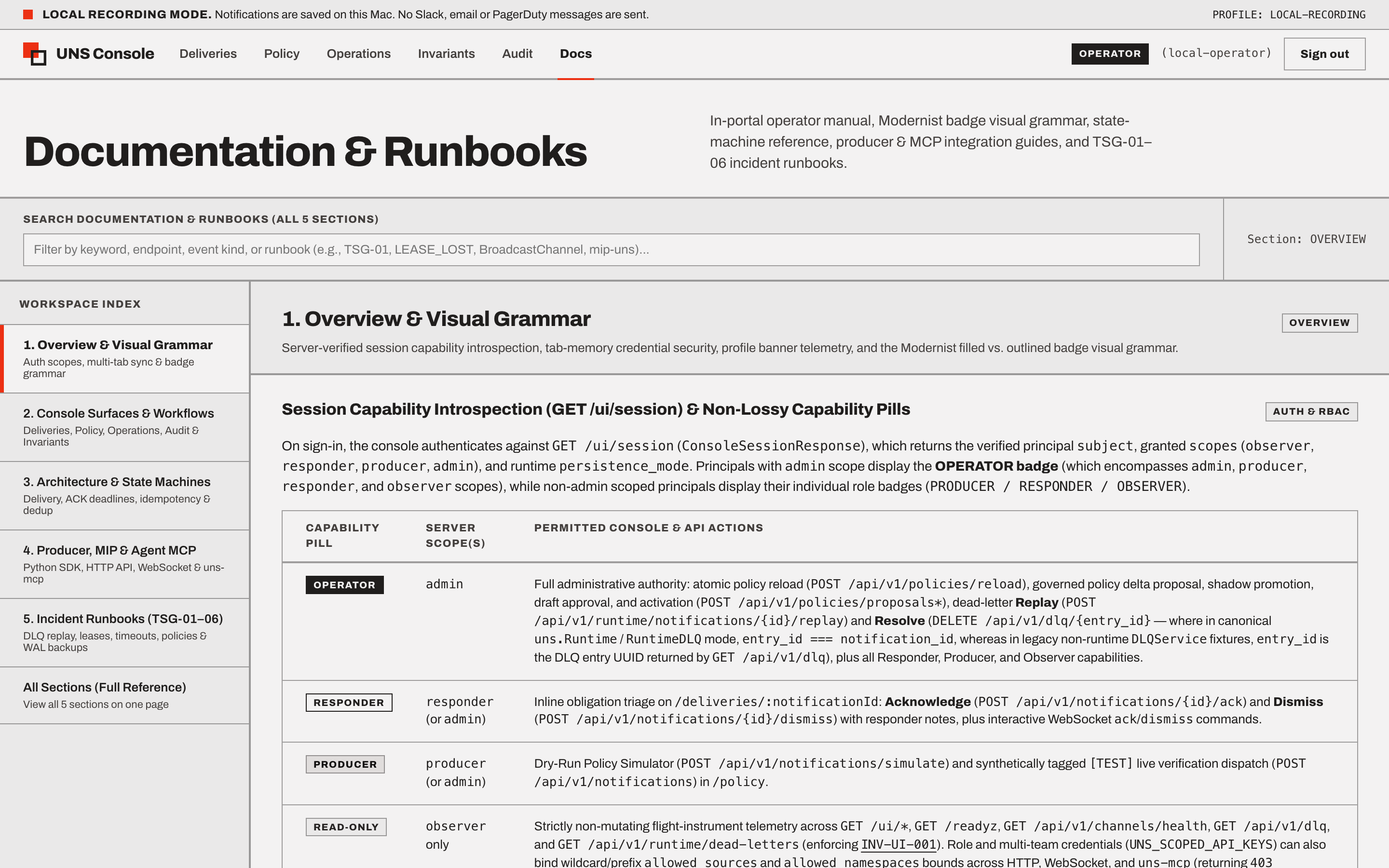
- Purpose: Built-in operator manual, state-machine reference, producer/MCP integration cookbook, and TSG-01–06 incident runbooks (
/docs). - How to Use:
- Use the sticky
260pxleft index rail or?section=URL deep-links (overview,workflows,state-machines,integration,runbooks,all) to jump directly to a domain. - Type into the top keyword search bar (
docs-search-input) or deep-link via?q=<keyword>(e.g.,/docs?section=runbooks&q=TSG-01) to filter across all 5 sections and all 6 Troubleshooting Guides in real time.
4. Acting on Console Findings (Incident Runbooks)
When you identify an operational incident in the console, consult the /docs?section=runbooks workspace or the repository Troubleshooting Guides:
- Failed / Dead-Lettered Delivery: TSG-01: Dead-Letter Queue (DLQ) Triage & Safe Replay
- Expired Worker Leases or UNKNOWN SMTP Provider Effects: TSG-02: Expired Worker Leases & Uncertain Provider Effects
- Timed-Out Acknowledgment or Exhausted Callbacks: TSG-03: Acknowledgment Timeouts, Escalations, & Callback Failures
- Policy Reload Conflict or Producer Override Rejection (422): TSG-04: Policy Lifecycle, Shadow Promotion, & Override Rejections
- MCP Startup Error or Agent WebSocket 1008 Disconnect: TSG-05: MCP Process Lifecycle & Agent WebSocket Recovery
- SQLite Retention (uns-maintain) & Online Backups: TSG-06: Database Maintenance, Retention, & Archive Recovery